Tools / Vidyard
About Vidyard
Record, share, and track video messages for sales and marketing. Includes analytics, branded pages, CTAs, and integrations with CRM tools.
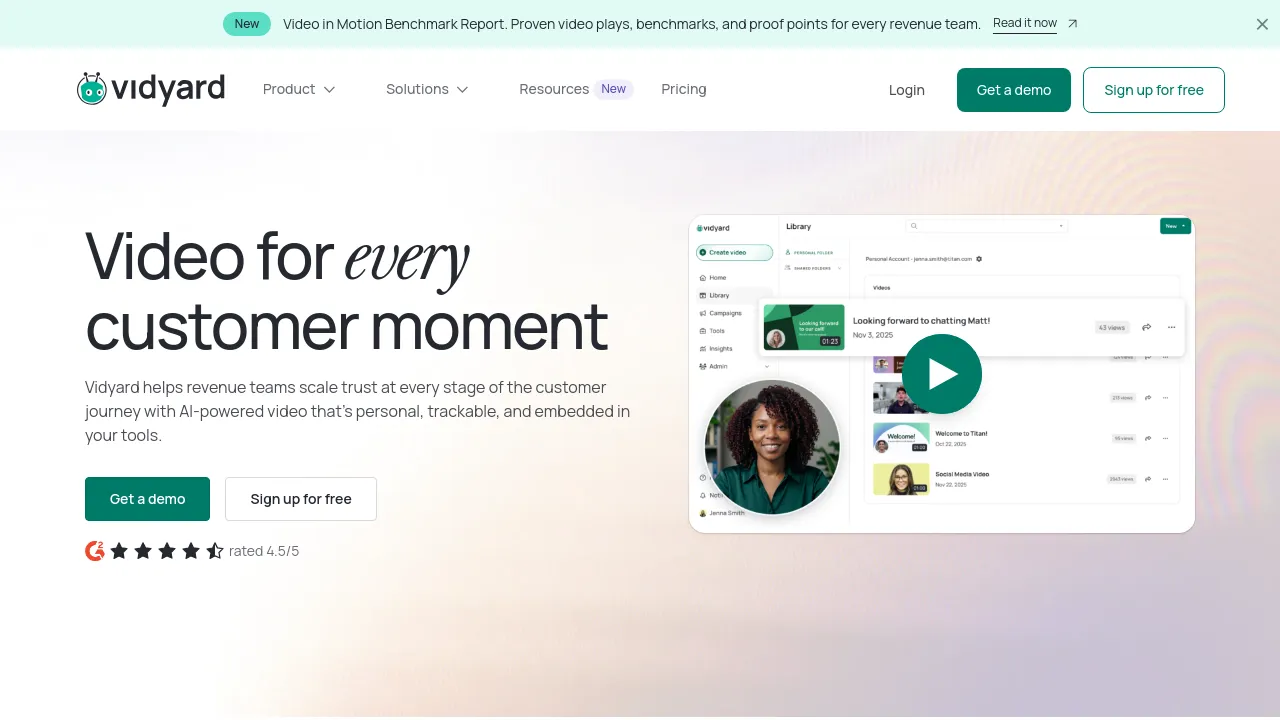
Vidyard is a video platform for sales, marketing, and customer communication. Teams use it to record and send video messages, generate AI videos, track how those videos perform, and embed video workflows into the revenue tools they already run. The product is web-based and covers the full cycle from creation to sharing, tracking, and automation.
Recording features include screen capture, custom backgrounds, and captions. Paid plans come with unlimited recording. Shared videos play on branded pages where viewers can click calls to action, and videos can be password-protected and sorted into folders. Analytics cover both individual video performance and team-level results, so managers can see who is using video and what it produces.
Pricing starts with a Free plan. Starter costs $89 per seat per month, or $59 per seat per month billed annually. Teams and Enterprise use custom pricing and are positioned for teams of five or more and enterprise revenue teams respectively. An optional Video Agent add-on for AI video automation runs $29 per seat per month on Starter, or $24 billed annually. Vidyard integrates with Salesforce, HubSpot, Marketo, Salesloft, Gong, Outlook, Slack, Reply, and Zapier, so video activity can surface inside the CRM and outreach platforms a team already uses.
Best for
- Sales reps sending personalized video messages in outreach and follow-ups
- Revenue teams that want video engagement data inside Salesforce or HubSpot
- Marketing teams building video workflows and tracking campaign performance
- Support and customer success teams explaining products or troubleshooting on video
- Sales managers who need team-level analytics on video usage and results
- Individuals testing video messaging on the free plan before paying for a seat
Frequently asked questions
How much does Vidyard cost?
There are Free, Starter, Teams, and Enterprise plans. Starter is $89 per seat per month, or $59 per seat per month billed annually; Teams and Enterprise use custom pricing. A Video Agent add-on costs $29 per seat per month on Starter, or $24 billed annually.
Is there a free plan?
Yes. The site lists a Free plan alongside the paid tiers, though the reviewed pages don't spell out its recording or feature limits.
Does Vidyard have a mobile app?
The pages reviewed describe web-based access only, with no visible mention of native iOS, Android, or browser-extension apps. Check the site for current platform support.
Which tools does Vidyard integrate with?
Highlighted integrations include Salesforce, HubSpot, Marketo, Salesloft, Gong, Outlook, Slack, Reply, and Zapier.
Can I see who watches my videos?
Yes. Vidyard provides analytics on individual video performance plus team-level performance data, so you can track viewing activity and results.
Is Vidyard open source?
The site doesn't mention an open-source offering or an offline mode.
Alternatives
- Intelli TV — for interactive video hosting and playback rather than sales-focused video messaging.
- demoshake — for building product demos instead of recorded video messages.
- Studiobit — for live video sessions with guests rather than asynchronous recorded messages.
- Novacy — for behavioral sales analytics and forecasting without the video creation layer.
- Reach.ly — for sales outreach experiences when video recording isn't the focus.
Similar to Vidyard
New tools, once a week.
One weekly email with curated tools and founder insights. Unsubscribe anytime. Check our privacy policy.