Tools / Hemingway Editor
About Hemingway Editor
Color-codes wordy sentences, adverbs, and passive voice, and scores readability. Use the free web editor or the offline desktop app for Mac and PC.
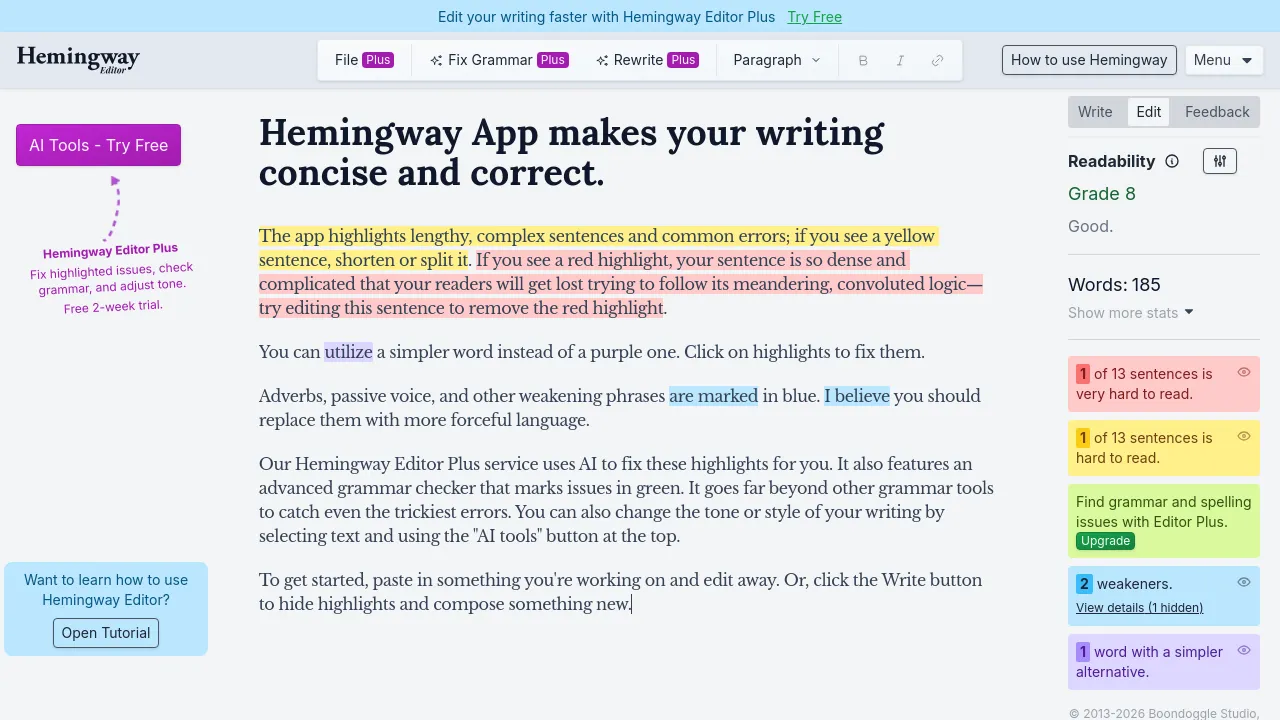
Hemingway Editor is a writing app that grades prose the way a strict copy editor would. Paste in a draft and it color-codes the problems: long, hard-to-read sentences, unnecessary adverbs, passive voice, and complicated words each get flagged in their own color. Next to the highlights, it shows an overall readability grade plus word count and reading time, so you can tell at a glance whether a piece reads at a fifth-grade level or needs another pass. The workflow is straightforward: write or paste, fix what the highlights flag, and watch the grade improve as sentences shorten.
The name comes from Ernest Hemingway, whose short, plain sentences are the style the app pushes toward. You can write directly in the editor or paste text in, and basic formatting tools are built in so you can shape a draft without switching apps. It runs as a free web editor in the browser, and there is a desktop app for Mac and PC that works offline — handy for drafting on a plane or anywhere the Wi-Fi is unreliable.
The free tier covers the core highlighting, grading, and formatting. The paid tier, Hemingway Editor Plus, layers on AI features: grammar checking beyond the color highlights, sentence rewrites, and adjustments to tone, length, and formality. Plus plans start at $100 per year on the annual plan, with separate options for individuals and teams. Enterprise plans add single sign-on through providers such as Okta and Microsoft Entra, along with team billing.
Best for
- Bloggers and content writers who want a quick readability pass before publishing
- Marketers trimming web copy, landing pages, and email drafts down to size
- Students and academics cutting wordy essays and papers to a readable length
- Nonfiction authors doing a second pass on adverbs and passive voice
- Communications teams that need public-facing copy readable at a low grade level
- Writers who draft offline and want a Mac or PC desktop app
Frequently asked questions
Is Hemingway Editor free?
The web editor is free to use. The AI features sit behind the paid Editor Plus subscription, which starts at $100 per year on the annual plan.
What do the colored highlights mean?
Each issue type gets its own color — wordy or hard-to-read sentences, adverbs, passive voice, and complex words are flagged separately — and the app also shows an overall readability grade for the whole piece.
Can I use it offline?
Yes, with the desktop app for Mac and PC, which the site says works without Wi-Fi. The web version runs in a browser instead.
Is there a mobile app?
The site shows a web app and desktop apps for Mac and PC. No iOS app, Android app, or browser extension appears on the site.
What does Editor Plus add?
AI grammar checking, sentence rewrites, and controls for adjusting the tone, length, and formality of your text.
Does it support teams?
Yes. There are Plus plans for teams with centralized billing, and enterprise plans that include single sign-on through providers such as Okta and Microsoft Entra.
Alternatives
Hemingway Editor scores and tightens text you have already written; it does not draft for you. The closest match on this list:
- Wordware — an AI assistant that learns your context and helps produce work; pick it if you want help generating content rather than grading a finished draft.

Similar to Hemingway Editor
New tools, once a week.
One weekly email with curated tools and founder insights. Unsubscribe anytime. Check our privacy policy.